What is the role of Odoo Barcode Scanner in Inventory Management?
Published on July 29th 2022
What do you mean by Barcode?
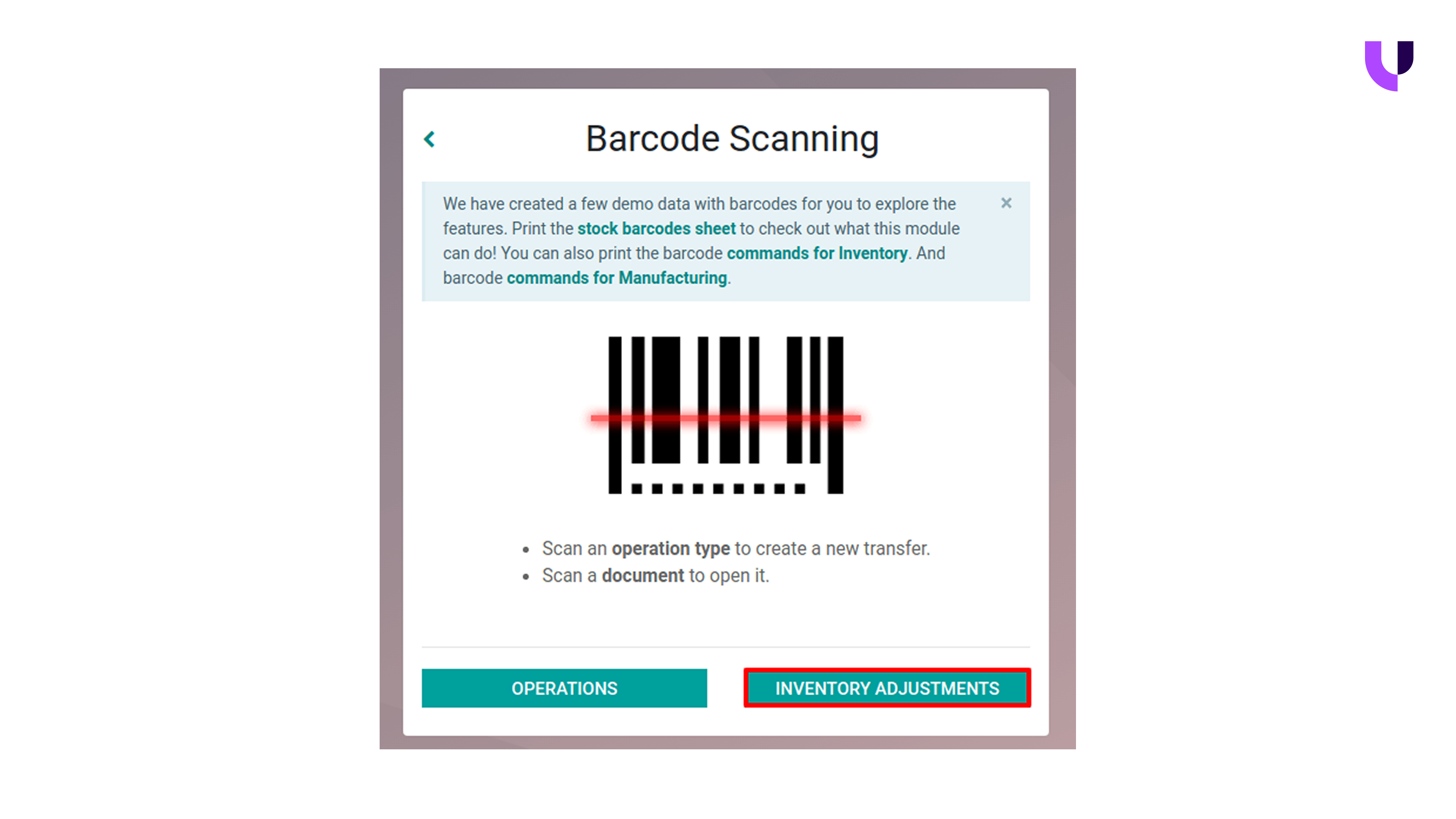 A barcode is a simple way to represent your product information in a format that machines can read instantly. It usually appears as a black-and-white pattern or a square code, each linked to your product details, such as the item name, SKU, serial number, or batch information.
When a barcode is scanned, the information is entered directly into your system without manual data entry. This makes barcode scanning especially useful in inventory environments where speed and accuracy matter. Instead of entering product details line by line, your warehouse teams can scan a barcode and move on to the next task within seconds.
Barcodes are also easy to create and maintain. They can be generated by inventory systems and printed on labels attached to your products, shelves, or packages. In Odoo, barcodes are directly linked to your inventory records, so every scan updates stock information in real time and keeps data aligned across your warehouse operations.
If you are already using Odoo for inventory management, here’s how barcode scanning can be seamlessly integrated into your existing workflow.
Want to start a project with us?
Empowering businesses to achieve greatness through strategic guidance and innovative solutions.
Book A Demo
How Barcode Scanning Works with Your Existing Odoo Inventory?
Odoo’s barcode scanning works by layering real-time scanning directly onto your existing inventory operations. It does not change how inventory is structured or controlled in Odoo; instead, it changes how data enters the system. Here’s how the process works from setup to daily warehouse execution.
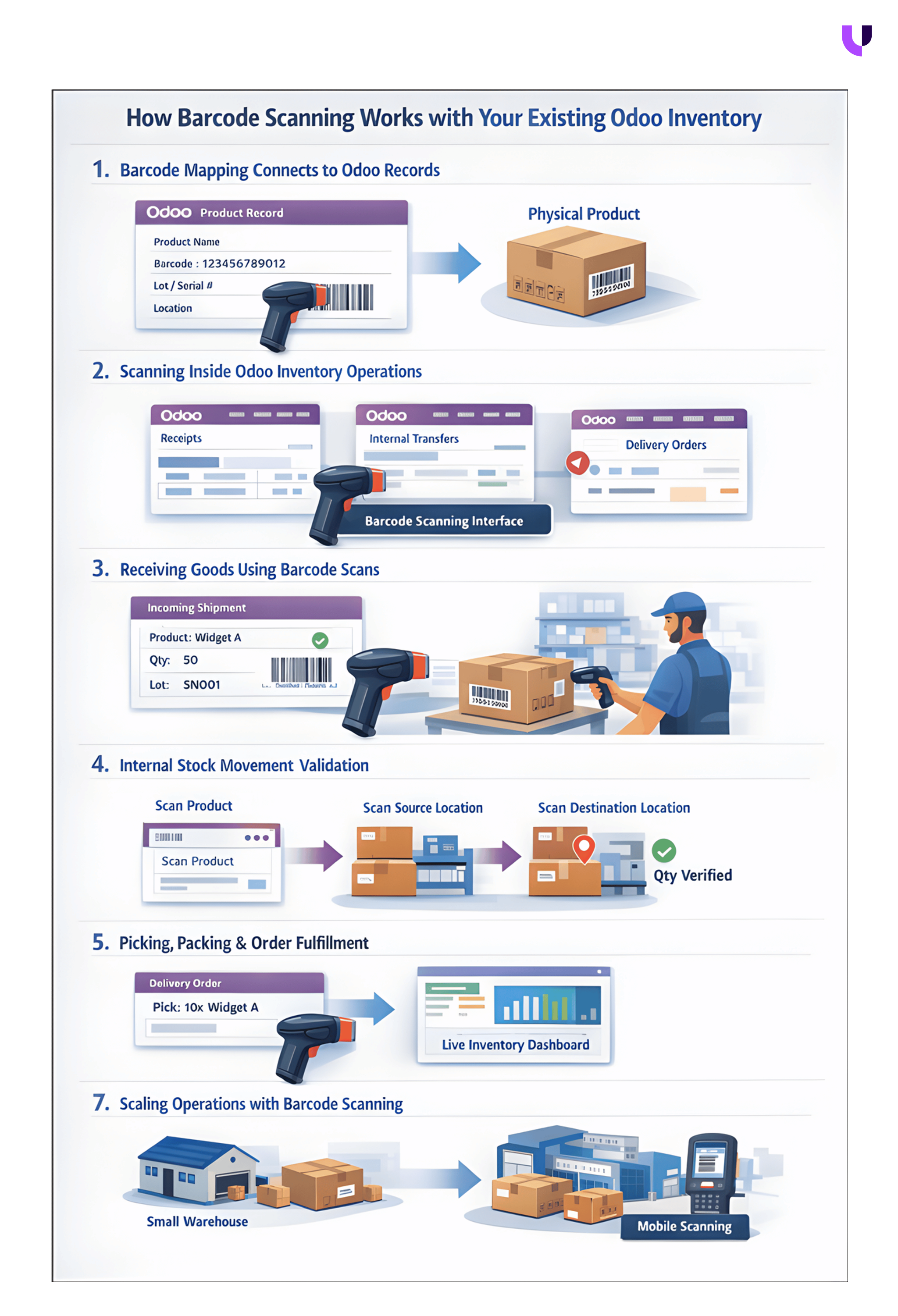
Step 1: Barcode Mapping Connects Physical Stock to Odoo Records
The process starts by linking barcodes to your inventory records in Odoo. Each product, package, or location is assigned a unique barcode inside Odoo’s inventory module. These can be manufacturer-provided barcodes, internally generated codes, or barcodes created specifically for lots and serial numbers.
This mapping creates a direct relationship between physical items in the warehouse and their digital records in Odoo. Once mapped, Odoo can instantly identify a product the moment it is scanned, without requiring manual searches or data entry. This step ensures that every scan translates into a validated inventory action rather than a raw data input.
Step 2: Barcode Scanning Activates Inside Existing Inventory Operations
After barcode mapping, scanning becomes available inside existing inventory workflows. Warehouse teams do not switch to new modules or screens. Instead, they open the same operations they already use—receipts, internal transfers, picking, packing, and deliveries, through the barcode scanning interface.
At this stage, barcode scanning replaces keyboard inputs. When a product is scanned, Odoo automatically fills in product details, expected quantities, and tracking requirements. The workflow remains the same, but execution becomes faster and more reliable.
Step 3: Receiving Goods Using Barcode Scans
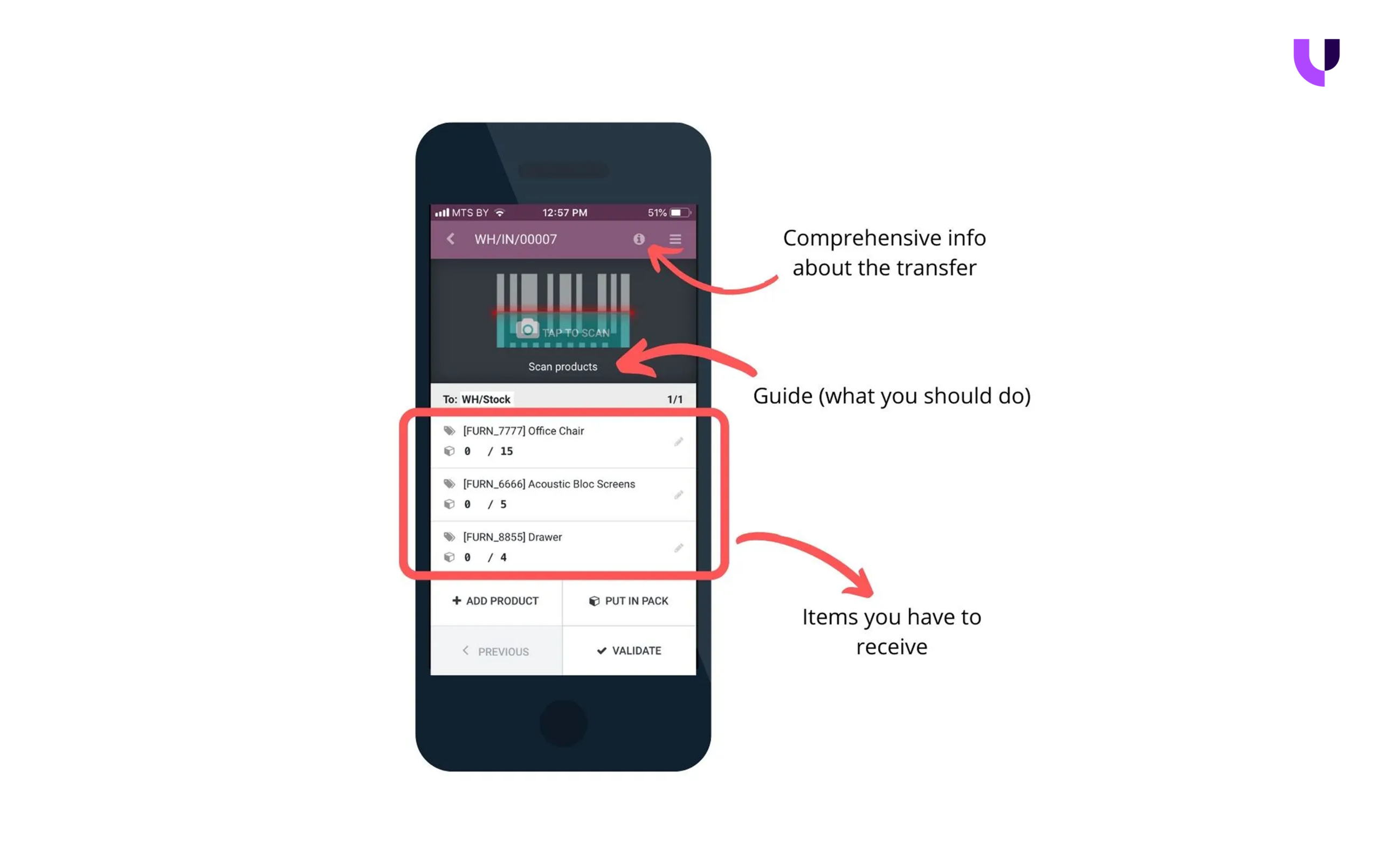
When goods arrive, the receiving team opens the incoming shipment in Odoo’s barcode app. Each scan instantly identifies the product and updates the received quantity in real time. If the product requires lot or serial tracking, Odoo prompts the user to scan or assign the appropriate numbers before allowing confirmation.
Odoo also validates whether the received quantities match the purchase order and whether the product belongs to the correct location. Any discrepancy, extra items, missing quantities, or incorrect tracking, gets flagged immediately, ensuring accuracy at the point of entry rather than during reconciliation.
Step 4: Internal Stock Movement with Location Validation
For internal transfers, barcode scanning confirms both what is being moved and where it is going. Warehouse staff scan the product, followed by the source and destination locations. Odoo validates whether sufficient stock exists and whether the movement aligns with defined routes and stock rules.
This prevents common issues such as moving stock to incorrect locations or bypassing approval rules. Each scan is recorded as a traceable inventory movement, maintaining full visibility across the warehouse.
Step 5: Picking, Packing, and Order Fulfillment
During order fulfillment, barcode scanning ensures accuracy from shelf to shipment. Pickers scan products directly from storage locations, and Odoo verifies that the correct items, quantities, and lot or serial numbers are being selected. This drastically reduces mispicks and incorrect shipments.
As items are packed, barcode scans confirm package contents and shipping readiness. Once the delivery is confirmed, Odoo automatically updates stock levels, shipment status, and movement history, without any manual intervention.
Step 6: Real-Time Inventory Updates and System-Wide Accuracy
Every barcode scan updates inventory records instantly. Stock quantities, locations, and tracking details are reflected across Odoo in real time. This ensures that sales, procurement, and operations teams always work with accurate data, eliminating delays caused by batch updates or manual corrections.
Step 7: Scaling Operations Without Changing Inventory Logic
As business volume grows, barcode scanning scales naturally. Teams can move from basic scanners to mobile devices, expand across multiple warehouses, and handle higher order volumes, all without modifying the core inventory setup. Odoo continues enforcing the same rules, validations, and controls regardless of scale.
Why choose Odoo Barcode Scanner App for Inventory management?
As your inventory operations grow, your warehouse team may notice small inefficiencies that slow their operations. Odoo's barcode scanning addresses these challenges by making your everyday inventory tasks easier to manage, more accurate, and less manual-intensive. Here’s why many teams adopt it as part of their inventory workflows.
1. It is easy for warehouse teams to understand and use
Managing barcodes in Odoo does not require technical expertise. The barcode scanning interface follows the same inventory workflows your team already uses, allowing warehouse staff to start scanning products and locations with minimal training and little disruption to daily operations.
2. It offers a cost-effective way to automate inventory operations
Implementing barcode-based inventory management with Odoo is economical to set up and maintain. With basic scanning hardware and your existing Odoo capabilities, businesses can automate product identification and stock updates without heavy upfront investment or ongoing system costs.
3. It is built on familiar and widely adopted technology
Barcode scanning is a commonly used technology across industries, which makes adoption easier for warehouse teams. Since it aligns with standard ERP practices, onboarding is faster and resistance to change is significantly reduced.
4. It helps reduce manual errors in everyday stock operations
By replacing manual data entry with barcode scans, Odoo minimizes the risk of incorrect product codes, quantities, or serial numbers. Each scan captures data instantly, helping maintain consistency between physical stock and system records.
5. It works within Odoo’s existing security and access controls
Barcode scanning in Odoo operates within the platform’s built-in security framework. Inventory actions performed through scanning follow predefined user roles and permissions, ensuring that only authorized users can update stock, validate movements, or complete transfers. Every scan is recorded as part of an inventory transaction, making stock changes traceable and auditable.
6. It supports mobile barcode scanning for faster warehouse movement
Odoo enables barcode scanning directly on mobile devices through its app, allowing teams to scan products, locations, and packages using smartphones or tablets. This removes dependency on fixed workstations and supports faster operations across the warehouse floor, especially during picking, transfers, and stock counts.
Knowing the benefits, it’s the right situation to understand the hardware options you can use for barcode scanning and learn how it fits into your existing inventory management flow.
Understanding the Hardware Options Available for Odoo Barcode Scanning
Odoo has designed barcode scanning to work with a wide range of hardware setups, allowing you to choose devices based on your warehouse size, movement patterns, and operational complexity. Since barcode scanning runs through standard input methods, most scanners work seamlessly with Odoo without requiring specialized or proprietary hardware.
Below are the commonly used hardware options for barcode scanning when managing your inventory in Odoo.
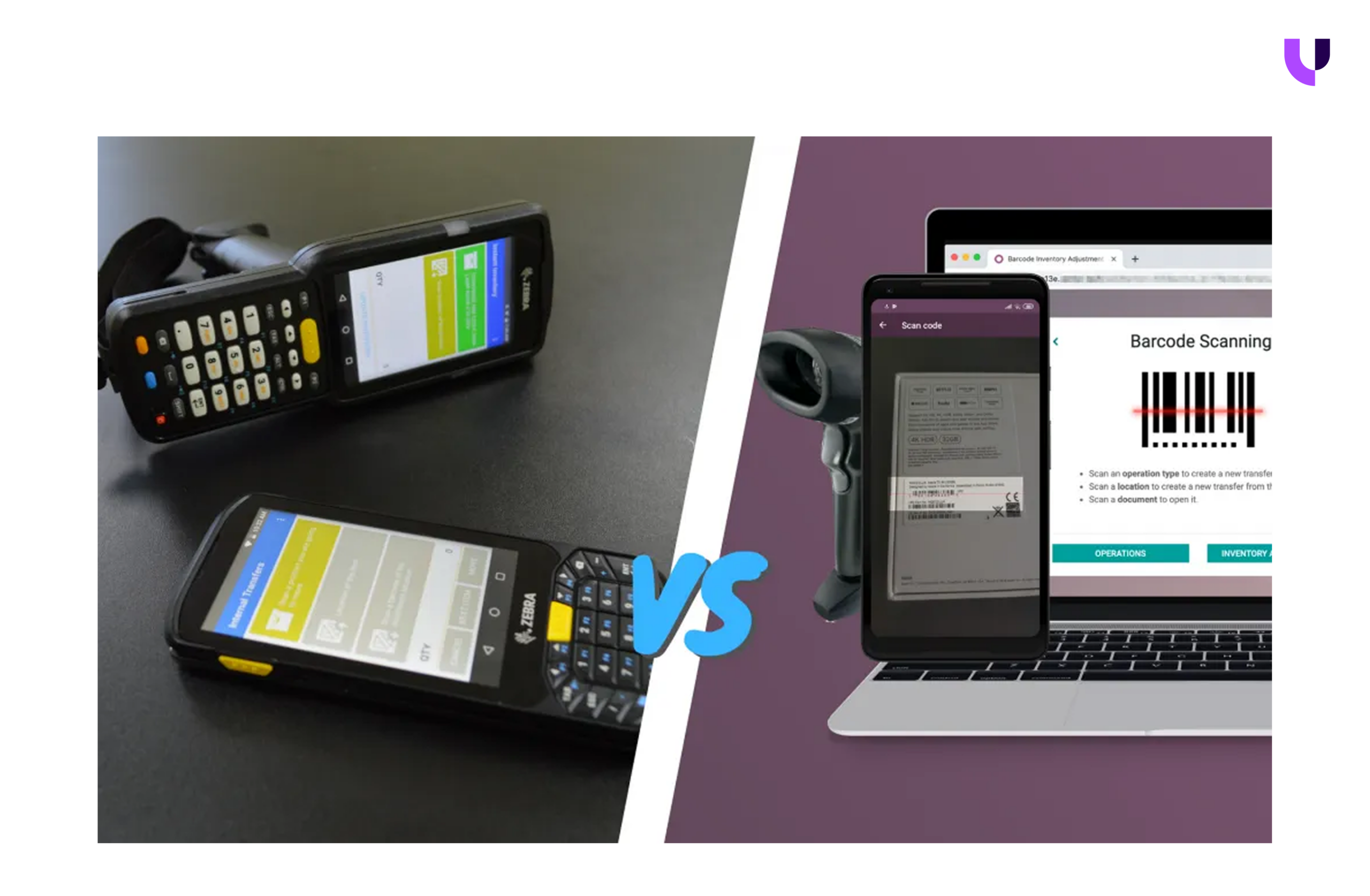
USB Barcode Scanners for Fixed Scanning Points
USB barcode scanners connect directly to desktop or laptop systems and function as keyboard input devices. When a barcode is scanned, the data is entered instantly into Odoo without any additional configuration.
They are best suited for inventory activities that take place at fixed locations such as receiving desks, packing stations, or dispatch counters. USB scanners help reduce manual typing errors and speed up repetitive scanning tasks while keeping the setup simple and cost-effective.
They work best when:
- Scanning happens at a single workstation
- Inventory movement is limited
- Teams prefer a plug-and-play setup
Bluetooth Barcode Scanners for Mobile Warehouse Operations
Bluetooth barcode scanners pair wirelessly with smartphones, tablets, or computers, allowing staff to scan products while moving freely across the warehouse floor.
This mobility makes them ideal for operations like picking, internal transfers, replenishment, and stock counts. By enabling scanning at the point of action, Bluetooth scanners reduce unnecessary movement and help warehouse teams complete tasks faster without returning to fixed workstations.
They are ideal for:
- Medium-sized warehouses
- Frequent aisle-to-aisle movement
- Flexible, mobile workflows
Mobile Devices for Barcode Scanning
Odoo also supports barcode scanning directly through mobile devices such as smartphones and tablets. Using the device camera, your warehouse teams can scan barcodes without external scanners, making this a practical option for teams that want to minimize hardware dependency.
Mobile barcode scanning is particularly useful for stock counts, internal transfers, and picking operations where your teams need to move freely across the warehouse floor.
Using Mobile Devices for Barcode Scanning
Odoo also supports barcode scanning directly through mobile devices using the device camera. This option removes the need for dedicated scanning hardware, making it practical for teams looking to minimize equipment dependency.
Mobile scanning is suitable for low-to-medium scanning volumes and temporary or growing warehouse operations. While it may not match the speed of dedicated scanners, it offers convenience and flexibility for tasks such as stock counts, internal transfers, and quick inventory checks.
This option works well when:
- Hardware investment needs to be minimal
- Scanning volumes are moderate
- Flexibility is a priority
Choosing the right hardware depends on how inventory moves within your warehouse. Let us now look at how to decide which barcode scanning setup fits your operational needs.

About Author
Kalpesh Gajera is the Chief Technology Officer at UNCANNY Consulting Services, specializing in Odoo, ERP, and eCommerce technologies. He focuses on building scalable enterprise solutions that help organizations streamline operations, improve efficiency, and accelerate digital transformation initiatives.


Kalpesh Gajera is the Chief Technology Officer at UNCANNY Consulting Services, specializing in Odoo, ERP, and eCommerce technologies. He focuses on building scalable enterprise solutions that help organizations streamline operations, improve efficiency, and accelerate digital transformation initiatives.