The Ultimate Shopify Migration Checklist for 2026 eCommerce Moves
Published on March 31st 2026
A Shopify Migration Checklist That Keeps the Storefront Intact
Most migrations lose grip on keeping the storefront working. Rankings drop, customer data gaps appear, integrations break, and revenue dips before anyone analyzes the real problem. This checklist covers four phases to ensure nothing critical is missed, deferred, or assumed.
Phase 1: Pre-migration Audit & Data Cleansing
Understand your current store, document what exists, and remove what no longer belongs. The quality of what enters the new Shopify store depends entirely on what leaves the old platform.
1. Conduct a Full Store Audit Before Moving Anything
which assets actively support revenue, operations, and customer experience, and which ones are simply accumulated technical debt. Without that visibility, you risk transferring too much, missing critical dependencies, or rebuilding workflows your business no longer needs.- Product catalog, including variants, bundles, and collection logic
- Customer records and segmentation data
- Order history and fulfillment-related data
- Blog posts, landing pages, FAQs, and policy pages
- Existing URL structure and key indexed pages
- Custom functions, scripts, and workflow automations
Tip: Categorize every item into three buckets: Migrate, Retire, or Rebuild.
2. Define Scope, Ownership, and the Shopify Path Early
Shopify migration projects become expensive when the scope of the storefront remains vague. Without it, teams default to assumptions regarding what needs to move, who is responsible for each decision, and what the platform needs to support.Those assumptions are where timelines stretch, budgets expand, and accountability quietly disappears.
Define the scope early:
- Which data sets need to be migrated, and which ones can be excluded
- Whether the project includes only migration or also redesign, re-architecture, and UX changes
- Who owns SEO, data validation, integrations, QA, content, and launch approvals
- Which teams or stakeholders need to sign off before go-live
- Whether your business needs standard Shopify, a more advanced plan setup, or Plus-level capabilities
- Define success criteria for traffic stability, operational continuity, and launch readiness
Tip: Don’t combine a full platform migration with a major redesign unless you have a strong reason to do both at once. Changing too many variables makes it harder to trace what caused a traffic drop, a conversion issue, or a launch-day failure.
If the project scope is still hanging between migration, redesign, and platform choice, Uncanny’s Shopify consulting services help you determine the right questions and path prior to the build.
3. Benchmark Current Performance Metrics
Benchmarking current performance before migration gives the team a fixed reference point for everything that follows. Without it, any dip in speed, rankings, or conversions after launch becomes impossible to diagnose. There is no baseline to measure against and no way to separate a temporary fluctuation from a problem that needs immediate attention.What to benchmark before migration:
- Core Web Vitals and overall page load speed
- Organic traffic levels and top-performing landing pages
- Conversion rate and cart-to-checkout progression
- Revenue contribution from key products, collections, or content pages
- Bounce rate and engagement on important commercial pages
- Indexed pages and current keyword visibility
Tip: Focus benchmarking on the pages and metrics that directly affect revenue, SEO visibility, and customer acquisition, not every data point in your analytics platform.
4. Back Up the Store and Define the Rollback Path
Migration carries risk regardless of how well the pre-migration work has been done. A backup and rollback path is not a contingency for a failed migration; it is a standard requirement for any move where revenue continuity and data integrity cannot afford to be interrupted.The question is not whether something could go wrong during a live migration. It is whether the team has a documented, tested path back to the working store.
What to secure before any migration work begins:
- Complete export of product, customer, and order data in a format that can be reimported if needed
- Full backup of theme files, media assets, and store content
- Copies of all SEO metadata, redirect rules, and sitemap files
- A staging environment that mirrors the live store for testing without affecting live operations
- Documented rollback trigger conditions, such as the specific scenarios that would require reverting to the old platform
- Confirmation that the rollback process has been tested before go-live, not assumed to work under pressure
- A defined ownership for who activates the rollback and who communicates it internally if triggered
The staging environment deserves particular attention. Testing on a live store during migration is one of the most avoidable sources of customer-facing disruption. A staging setup eliminates that risk entirely by giving the team a safe environment to validate and build the new store.
Tip: A rollback plan that exists only as a concept is not a rollback plan. Before the migration enters its final phases, confirm that the backup can be restored, that the staging environment reflects the current live state, and that the team responsible for triggering the rollback knows exactly what the rollback process entails.
5. Protect On-page SEO Elements
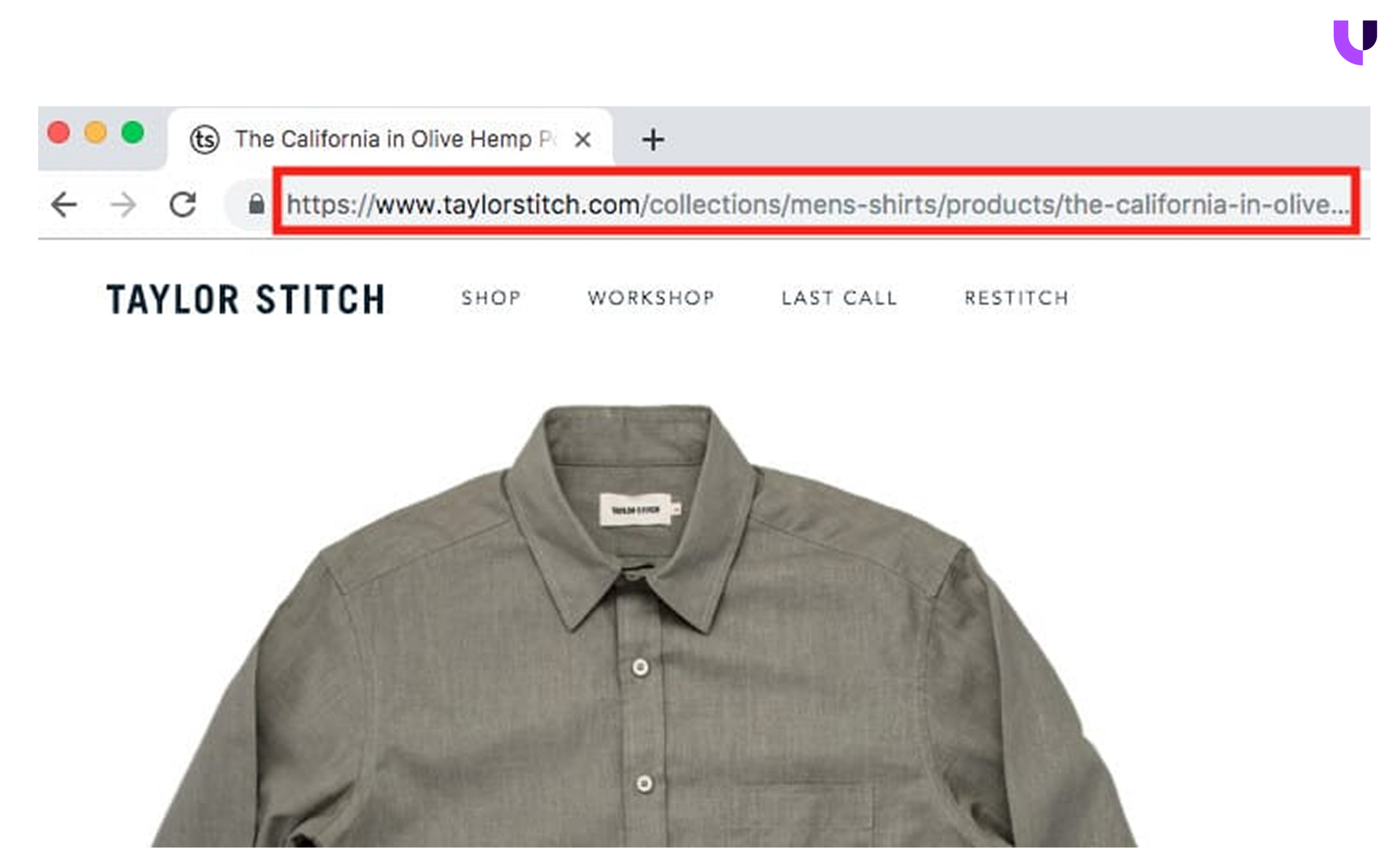
Migration is the wrong time to carry forward years of unresolved store issues. If the current store contains outdated products, broken redirects, duplicate pages, thin content, or obsolete scripts, those issues will carry over to the migration unless they are addressed first. The cleaner the source store is, the more efficient the Shopify build will be.
But cleanup alone is not enough. The pages and search signals that already drive traffic and revenue need to be protected just as carefully as the junk data is left behind. A store can launch cleanly and still lose visibility if URLs change without proper redirects or if important on-page SEO elements are not preserved.
What to clean and protect:
- Save copies of important media, content, and reporting exports
- Remove outdated SKUs, expired discounts, and unused collections
- Fix duplicate pages, broken redirects, and thin content
- Identify obsolete scripts, customizations, or workflow logic
- Preserve titles, meta descriptions, headings, image alt text, schema, and internal links on priority pages
This step is not just about cleanup. It is about protecting the authority, discoverability, and customer pathways that the current store has already built.
6. Audit Integrations and Technical Dependencies
Every system connected to the current store is a dependency that needs a decision before migration begins. Auditing external systems such as payment logic, fulfillment connections, subscriptions, and analytics tools clarifies what needs to be rebuilt, replaced, or retired.What to audit:
- Payment gateways and fraud tools for checkout failures
- Shipping and fulfillment systems to avoid carrier and rate logic issues
- ERP, CRM, OMS, or warehouse connections to analyze whether integrations need a custom API work
- Subscription tools for recurring billing and customer data portability
- Email marketing and retention platforms, including segments and automation flows
- Analytics, pixels, and attribution tools to confirm tracking continuity
- Tax and finance-related integrations that need rebuilding, not just copying over
- Inventory sync and multi-location logic across every active fulfillment channel
This audit helps you decide what needs to be rebuilt, replaced, consolidated, or dropped. It also reduces the risk of finding critical integration gaps halfway through the migration.
For stores with ERP, CRM, or order fulfillment connectors, Uncanny’s Shopify API integration services can help structure those connections before migration work moves too far ahead.
Phase 2: Technical Data Migration
Once the audit is complete and the foundation is planned, the actual work of moving your store begins. This phase is where preparation either pays off or falls apart, and the order in which you execute each step matters as much as the steps themselves.
7. Configure the New Shopify Store Before Final Data Import
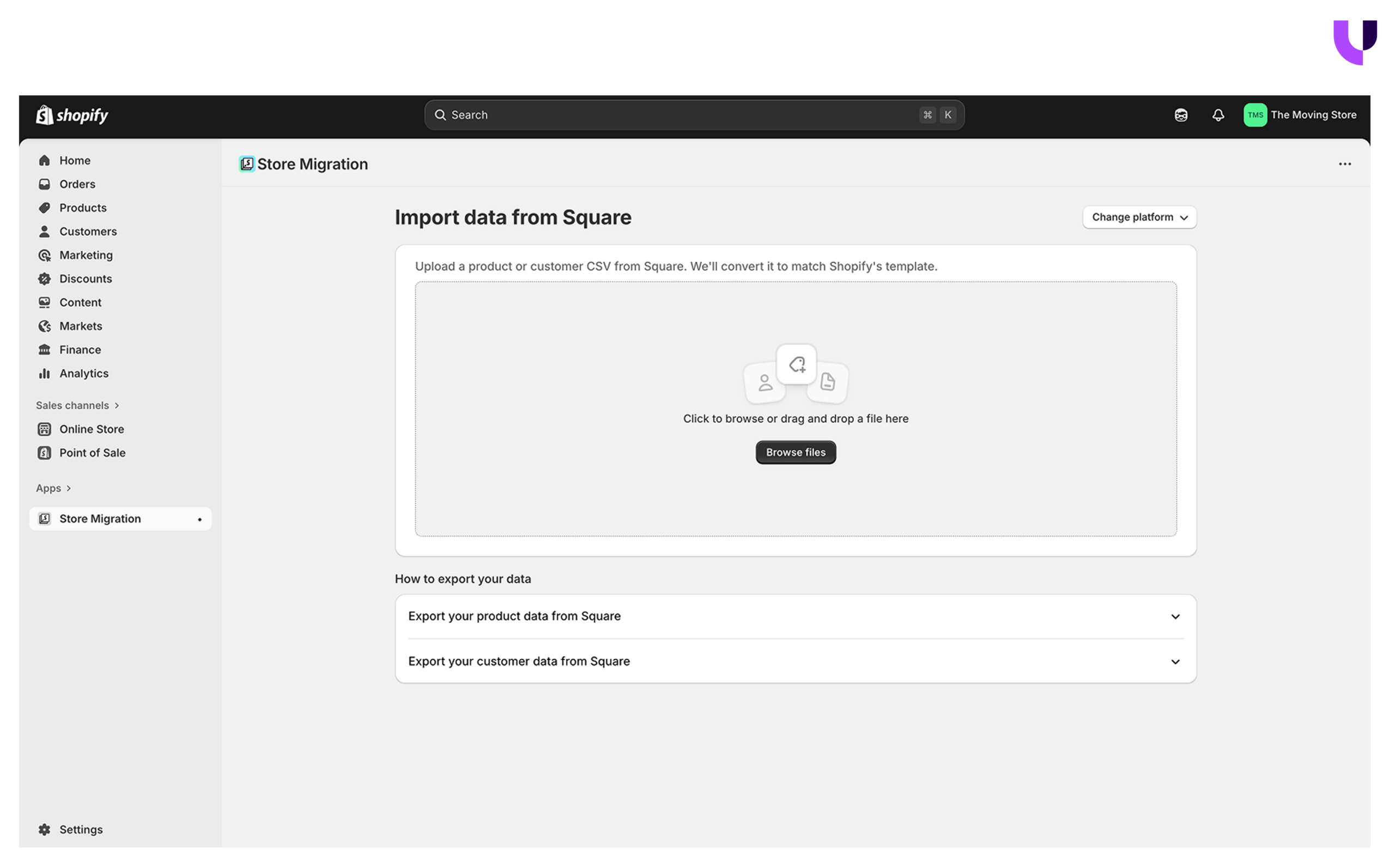 Setting up the Shopify store before any data arrives is not a formality but a structural requirement. Importing products, customers, and orders into an incomplete store creates configuration conflicts that are significantly harder to untangle after migration. The environment your data lands in needs to be ready to receive it correctly from the first import.
What to configure before the data transfer begins:
- Business details and store identity settings
- Currencies, tax rules, and regional pricing logic
- Payment providers and fraud prevention tools
- Shipping zones, rates, and carrier connections
- Domain setup and URL routing
- Staff accounts, roles, and access permissions
- Privacy settings and compliance configurations
- Store locations and warehouse or fulfillment logic
- Languages and international market settings
-
Required apps that affect how data is displayed or processed
Think of this step as building the operating environment before the business moves in. A store that is fully configured before import reduces the risk of data landing in the wrong place, displaying incorrectly, or triggering errors that trace back to settings that were never established.
Tip: Do not install every app you think you might need during this stage. Install only the apps that directly affect how imported data behaves. An overcrowded app environment under import can introduce conflicts that are difficult to diagnose later.
When the new store setup needs to be planned in the right order before import begins, Uncanny’s Shopify migration service helps structure that move with fewer configuration gap
8. Execute the Core Data Transfer: Products, Customers, and Orders
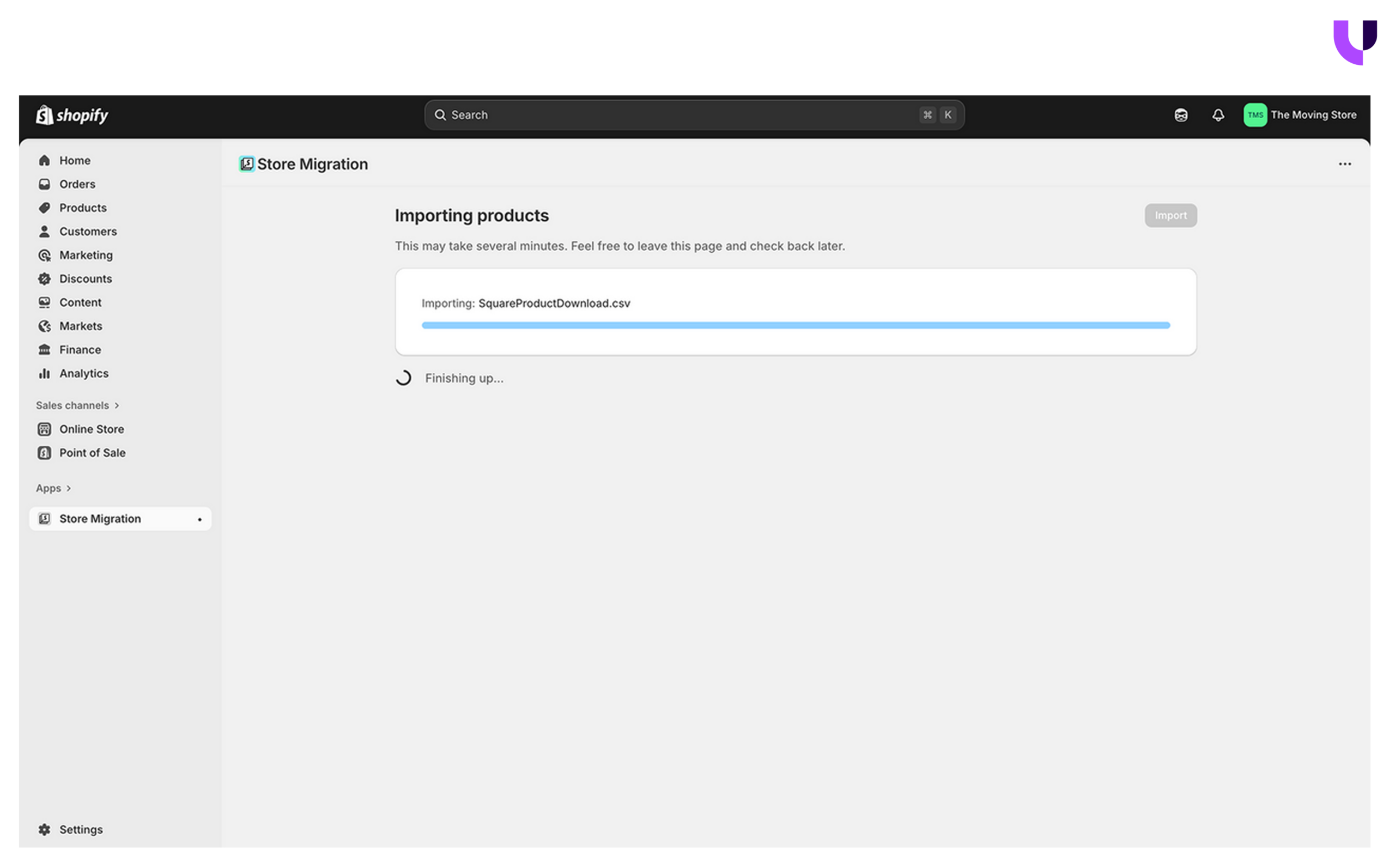 Data transfer is the operational heart of the migration, and how smoothly it goes depends almost entirely on the preparation done in Phase 1. Disorganised or uncleaned data moves as it is if it is not evaluated and structured before launch.
Migrate the full product catalog first, including titles, descriptions, SKUs, pricing, inventory levels, collection structure, and product images. Validate the output before moving forward. Errors in product data create downstream problems in every order record that references those products, and catching them during the technical audit phase costs significantly less.
Move to the customer profiles next. Transfer names, emails, addresses, and order histories. Passwords cannot be migrated because they are encrypted, and customers will need to reset them after launch. Confirm that customer segmentation tags and account data are transferred accurately before proceeding.
Orders and historical data come last. Transfer order history with associated fulfillment, payment, and shipping records. Confirm how far back the legacy platform allows order history to be pulled, and whether gift card balances or loyalty point records are transferred in full. Document any gaps for finance and support teams before go-live.
9. Plan Customer Account Handling and Password Reset Communication
Customer data can move to Shopify, but account access needs separate planning. The most operationally significant limitation is that passwords cannot be transferred because they are encrypted on the legacy platform. That means every customer with an account will need to reset their password the first time they attempt to log in on the new store.For stores with a large base of repeat buyers, this creates an immediate post-launch problem. It is a friction point that, if left unaddressed, directly affects login rates, repeat purchase behaviour, and support volume immediately after launch.
What to prepare before going live:
- A pre-launch email notifying customers that a platform change is underway
- A clear post-launch password reset communication with direct reset links
- A follow-up sequence for customers who did not engage with the first message
- A support team briefed on the expected volume and nature of reset requests
- Templated responses for common account access questions
- Confirmation that account-related automations are live and tested before launch
Tip:Tell customers about the password reset before the store goes live, not after. Customers who are surprised by an inability to log in are more likely to abandon than customers who were told in advance.
10. Migrate Content, Media, and Blog Assets
 Product and customer data get most of the attention in a migration, but content and media carry significant SEO and operational weight that is easy to underestimate until something breaks post-launch. A blog post that ranked well, a policy page customers reference before purchasing, or an FAQ that reduces support volume, all of these have real business value.
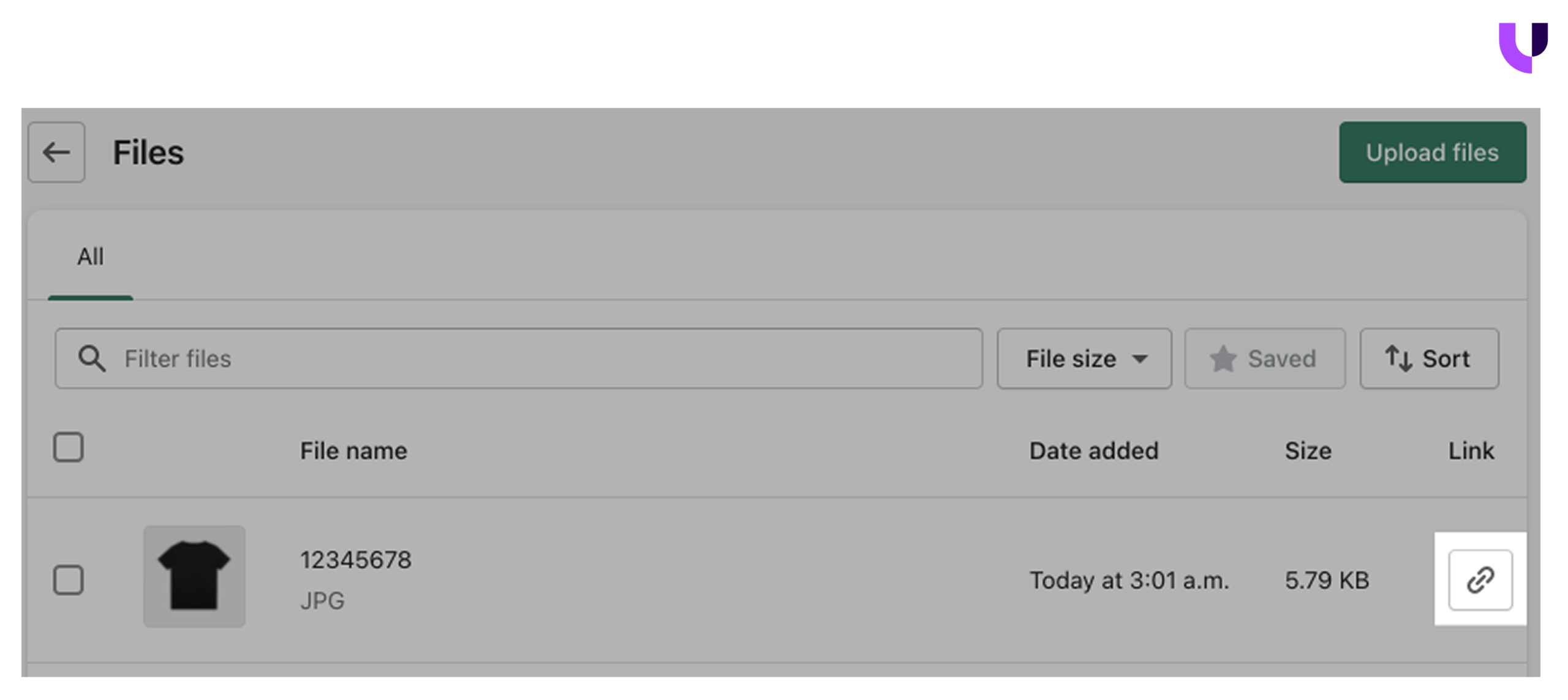
What to address during the content and media transfer:
- Images and video assets compressed for web performance before upload
- Alt text is preserved accurately across all product and content pages
- File naming conventions are maintained consistently to avoid broken references
Tip: Prioritize content that is indexed, linked to, or directly referenced in customer communication. Not every blog post from five years ago needs to move. Focus on what earns traffic, supports SEO, or reduces support load.
11. Verify Checkout Extensibility Compliance
 Shopify deprecated legacy checkout scripts with the move to Checkout Extensibility, meaning any custom checkout logic your store relied on previously cannot simply be copied over. It needs to be rebuilt using Shopify Functions and Checkout UI Extensions.This is not a cosmetic change. Legacy scripts that are not rebuilt on the current framework will either stop working entirely or create checkout behaviour that is inconsistent, unsupported, and incompatible with Shopify's ongoing updates. For any store that carried custom checkout logic from its previous platform, this step is non-negotiable before launch.
What to review and rebuild under Checkout Extensibility:
- Custom discount logic and promotional pricing rules
- Upsell and cross-sell elements within the checkout flow
- Custom field additions, such as gift messaging or delivery instructions
- Post-purchase pages and confirmation screen customizations
- Order validation logic that previously ran through scripts
- Any checkout UI changes built on the deprecated framework
The rebuild is also a good moment to question whether every piece of legacy checkout logic still needs to exist. Custom fields, upsell placements, and post-purchase screen additions that were built years ago may no longer reflect how customers actually move through checkout today. Rebuild what still earns its place and retire what does not.
Tip: Test the rebuilt checkout logic against edge cases, particularly discount stacking, multi-currency orders, and high-volume flash sale conditions. These are the scenarios where custom checkout logic is most likely to behave unexpectedly.
Our Shopify app development services replace unsupported customizations with cleaner, maintainable solutions that need to be rebuilt on Shopify’s current framework.
12. Implement a Content Freeze Before the Final Data Sync
A content freeze is the step that ensures the data you migrate is the final, complete, and verified version of your store. Without it, a gap opens between what the legacy platform holds at cutover and what Shopify actually receives, creating reconciliation work after launch.What the content freeze covers:
- Pause all product additions, edits, and collection changes on the legacy platform
- Stop publishing new blog content or making page edits
- Confirm that no new discount codes or pricing changes are created during the window
- Run a final delta sync to capture orders and customer accounts created after the primary transfer
- Verify that the data transferred matches the current live state of the old store
- Confirm the freeze window with all internal teams before it begins
The content freeze window typically runs 48 to 72 hours before the final cutover. For stores with high daily order volumes, the timing of this window needs to be planned around trading patterns. A freeze that begins during a peak sales period creates operational risk that a quieter window would avoid entirely.
Tip: Communicate the freeze internally first. Teams that are not informed will continue making changes on the old platform, undermining the integrity of the final sync.
Testing is the last opportunity in a Shopify migration checklist to identify what may have broken before customers do.
13. Test Storefront, Checkout, and Operations
 At this stage, "the site looks fine" is not an acceptable sign-off. What needs to be confirmed is that the entire business works end-to-end, not just that pages load and products display.
Work through the store systematically:
- Product discovery, search functionality, and collection filtering
- Individual product pages, including variants, images, and inventory display
- Cart behavior, including quantity updates, item removal, and price calculations
- Full checkout flow from cart through to order confirmation
- Payment gateway processing across all active payment methods
- Discount codes, automatic discounts, and promotional pricing logic
- Shipping rate calculations across zones and order weights
- Refund, cancellation, and return flows from both the customer and admin sides
- Fulfillment notifications and transactional email triggers
- Mobile responsiveness across the full purchase journey on multiple devices
- Third-party app behavior within the storefront and checkout
- Accessibility and page load speed under realistic traffic conditions
Place multiple test orders at different price points, with different shipping destinations, and using different payment methods. A single successful test order confirms one path works, but it does not confirm the store works.
Refer to our Shopify maintenance and support services that can help stabilize checkout logic, apps, or store operations before they reach customers.
14. Prepare the Launch-Day Cutover and Internal Escalation Plan
A launch without a documented responsibility map is where preventable migration mistakes tend to surface under pressure. Every person involved in go-live needs to know exactly what they own, when they own it, and who to contact if something goes wrong.Define and document before launch day:
- The confirmed launch window, including start time and expected completion
- DNS switch sequence and who is responsible for executing it
- Monitoring responsibilities across storefront, checkout, SEO, and analytics
- Escalation contacts for technical, commercial, and operational issues
- Rollback trigger conditions and the process for activating them if needed
- Communication plan for notifying internal teams when the store is live
- Confirmation that the content freeze is active and all teams are aware
- Final sign-off checklist requiring approval from SEO, QA, and operations before DNS switches
The launch window should be deliberately chosen. Avoid peak trading periods, end-of-month financial close windows, and times when key team members are unavailable. A quiet Tuesday morning creates significantly less risk than a Friday afternoon before a sales event.
Phase 4: Post-Launch Monitoring and Optimization
The first 30 days after launch are when the migration either holds or breaks. And how quickly issues are identified in this window determines whether they can be mitigated.
15. Submit the New Sitemap and Verify Crawl Configuration
Do these immediately after a DNS switch:- Generate the Shopify sitemap via the store's online store settings
- Submit the sitemap URL to Google Search Console under the Sitemaps report
- Submit the same sitemap to Bing Webmaster Tools
- Verify robots.txt is accessible and not blocking priority pages
- Confirm canonical tags are resolving correctly on key product and collection pages
- Check that noindex tags are not present on pages that should be indexed
Shopify generates a sitemap automatically, but automatic generation is not the same as automatic submission. Manual submission accelerates indexing and gives you a confirmed starting point for tracking discoverability from day one.
16. Monitor SEO Rankings, Crawl Health, and Traffic Signals Closely
Expect some movement in the first two weeks. Minor ranking shifts and short-term traffic fluctuations are normal as search engines reindex the new store. What is not normal and needs immediate attention is a sustained drop across multiple high-value pages. A spike in crawl errors, or a significant drop in indexed page counts relative to pre-migration baselines.Track daily for the first 30 days:
- Crawl errors and coverage issues in Google Search Console
- Indexation status across priority product, collection, and content pages
- Organic traffic against pre-migration baselines recorded in Phase 1
- Keyword ranking stability for top commercial and informational terms
- 404 errors indicating redirects that were missed or mapped incorrectly
Issues caught in the first two weeks are almost always fixable without lasting damage. Issues discovered at 60 days are rare.
17. Audit Core Web Vitals and Store Performance Post-Launch
Shopify's infrastructure is performance-optimized, but the store running on it reflects the decisions made during migration. Performance lags when uncompressed images, leftover apps from configuration, and theme code tissues show up unannounced.What to review to ensure optimal store performance:
- Run PageSpeed Insights across the homepage, top collection pages, and best-selling product pages
- Check the Core Web Vitals report in Google Search Console for field data
- Compare Largest Contentful Paint scores against pre-migration KPIs and settings
- Identify and compress any images that were not optimised during the content transfer
- Audit installed apps and deactivate any not actively serving a storefront function
- Check for render-blocking scripts in the theme that are slowing initial page load
- Verify mobile performance scores separately from desktop
If scores fall below the pre-migration benchmarks recorded in Phase 1, the cause is almost always traceable to one of the three things above, and they should be investigated in this order.
Our Shopify speed optimization services can help recover Core Web Vitals before the impact reaches rankings and conversion.
18. Communicate the Change Proactively to Your Customer Base
Customers notice when a store changes. A design can look different, navigation smoother, or a password reset for login, any of these creates friction if the customer wasn't told to expect it.The communication plan prepared in Phase 2 now needs to be executed, and the timing and targeting of each message determine how much of that friction is absorbed before it becomes a support issue or an abandoned session.
What to send and action after launch:
- Send a pre-launch notification email if not already sent during Phase 2
- Send a post-launch announcement email to the full customer base
- Include direct password reset links for account holders in the post-launch email
- Send a targeted follow-up to loyalty program members, addressing points and account status
- Send a separate follow-up to active subscribers confirming their subscription is unaffected
- Brief the support team on expected query types before the announcement goes out
- Monitor support ticket volume and response times in the first 48 hours after communication

About Author