9 Signs Your Shopify Store Is Not Scaling Well (2026)

Jigar Jariwala
Delivery Head
Jigar Jariwala is the Delivery Head at UNCANNY Consulting Services with expertise in Shopify, Mobile App Development, WordPress, and website design. He helps businesses build customer-centric digital experiences that drive engagement, improve online performance, and support long-term growth.

 14 Min Read
Published on March 30th 2026
9 Signals Your Shopify Store Is Busy But Not Growing
These nine signs show up when traffic and orders keep rising, but profit margins and operations do not improve alongside them.
1. Increase in Revenue But Decrease in Profits

More sales do not automatically mean more profits. Your Shopify store may be getting more orders and bringing in more revenue, yet still be less healthy as a business. If profit is not improving with growth, you are adding more volume without becoming more efficient.
This usually happens when the cost of acquisition and fulfilling each order rises as demand increases. As a result, revenue grows, but the value left in each order becomes weaker.
Signs that a Shopify store’s margin is leaking:
- Discounts are becoming more frequent just to keep sales moving
- Shipping and fulfillment costs are rising faster than the average order value
- Support tickets are increasing, but profit per order is not improving
- The business feels busier every month, but the bottom line is not strengthening
What to review in your order economics
- Take one order and calculate what it actually costs to win and fulfill
- Include product cost, packaging, shipping, transaction fees, discounts, and any support effort tied to that order
- Check whether profit per order is improving, staying flat, or declining as orders grow
- Compare rising sales against rising costs, not just against previous revenue
- Identify which cost line is growing fastest before increasing the acquisition further
If that number is shrinking month on month while your order count grows, you have a margin problem, not a traffic problem.
2. High Cart Abandonment Despite Healthy Traffic

Healthy traffic should create steady purchase movement. If shoppers are reaching your product pages, adding items to cart, and still failing to complete checkout, the issue is not attention. The problem is checkout friction at the point where buying intent should be strongest.
48% of shoppers abandon carts due to unexpected additional costs, such as shipping, taxes, and fees that only appear at the final step. There are other reasons too, such as forced account creation, long checkout flows, limited payment methods, and weak delivery clarity.
What makes this more serious is that, as you grow, abandoned carts become harder to recover manually, while the cost of losing those visitors keeps increasing.
Signs that buyers are dropping off your Shopify store:
- Cart recovery emails have low open rates or are not set up at all
- Checkout drop-off deteriorates as traffic or campaign volume rises
- No trust badge or security indicator appears near the payment step
How to audit the checkout journey
- Check how early shipping costs, taxes, and delivery timelines become visible
- Count how many steps stand between the add-to-cart and the order confirmation
- Review whether new buyers can check out without being asked to create an account
- Test whether payment options match what your customers expect to use
- Identify the exact point where buyers are dropping off most often
Friction in the final steps of the sales process can be a major issue, leading shoppers to leave their product purchase
3. Mobile Experience Becomes an Afterthought

Most of the people browsing your Shopify store right now are on a phone. That means mobile is no longer a secondary experience. It is where customers first discover products, compare options, and decide whether to continue.
A slow or cluttered UI experience loses conversions at the highest-volume part of the journey. Banners, popups, and widgets keep on adding, but no one stops to check whether the underlying theme customizations still hold up on a smaller screen.
The problem is that mobile is usually where all of that extra weight shows up first. A layout that feels acceptable on a desktop can become frustrating on a compact screen. By the time the drop appears in conversion data, the store has already lost sales across thousands of mobile visits.
Signs that a Shopify store's mobile experience is breaking down:
- Pop-ups that cover the screen and require precision tapping to close on a small screen
- Buttons and CTAs are placed too close together to tap accurately with a thumb
- Product images that are slow to load or appear cropped or out of proportion on mobile
- A checkout flow that requires excessive scrolling, zooming, or re-entering information
How to audit your mobile experience
Open your store on a mid-range Android device, not the latest model, and:
- Check whether the homepage, collection, and product pages load quickly and display properly
- Look for popups, banners, or widgets that block content or make navigation harder on a small screen
- See if buttons, filters, and variant selectors are easy to tap without zooming or repeated attempts
- Review whether product images, text, and pricing details are easy to read and understand on mobile
- Check whether a first-time buyer can complete checkout without zooming, scrolling back, or re-entering information
These are not design complaints. They are recurring conversion losses if the issue remains unfixed, costing numerous sessions and quietly reducing mobile conversion over time.
4. Store Performance Degrades as the Site Gets Heavier
As you add apps, media, custom themes, and third-party features, the storefront becomes harder to load and less stable to interact with. Shopify directly links Core Web Vitals to customer experience, discoverability, and conversion rates.
So when the platform starts degrading, it is not just a technical issue. It is a commercial warning sign that the store is becoming harder to browse and is forcing out potential buyers.
Adding each new tool or feature solves a short-term need, but no one is measuring the cumulative cost of all those additions. A heavier store may still work, but it introduces lag, layout instability, slower interactions, and a weaker page experience.
Signs of a non-performing Shopify store:
- Google PageSpeed Insights score below 60 on mobile
- Core Web Vitals trend downward over time instead of improving
- Product and landing pages take more time to load
- Interactions become laggy, especially on mobile
- Visual instability, delayed rendering, or pop-up-driven layout shifts disrupt browsing
How to strengthen your store performance
- Go through each installed app and ask this:
- Is this directly improving conversions or operations right now?
- If the answer is no, remove it. Compress product images before upload.
If the current theme was built on older, heavier code, a lighter alternative is worth evaluating. Also, schedule a quarterly review of page speed scores and Core Web Vitals.
To understand why this often happens even when traffic looks normal, read Uncanny’s breakdown of hidden Shopify performance issues.
5. Product Pages That Look Fine But Quietly Eradicate Trust
A product page can look designed, structured, and complete while still failing to convert. The issue is not always poor design. Sometimes the page simply does not answer enough of the questions a first-time buyer needs answered before making a purchase.
If shoppers cannot quickly confirm total cost, delivery expectations, return terms, sizing, product quality, or proof from other buyers, hesitation builds. Nothing on the page looks broken, but trust grows thinner with each piece of incomplete information.
Signs that your Shopify store is losing buyers:
- Reviews are missing, too few, or not helpful enough to reduce hesitation
- Shipping costs, return terms, or delivery timelines are hard to find
- Product images look polished but do not show enough detail, angles, or real-life context
- Sizing, specifications, or usage information is too limited for a confident first purchase
- The buy section lacks clear proof points that help a new customer feel reassured
How to turn your product page into a conversion asset
- Treat the product page as a decision-making surface, not just a merchandising layout
- Move delivery terms, return policy, and sizing guidance closer to the buy section
- Review which questions your support team answers most before purchase, and address them directly on the page
- Check whether a first-time visitor can make a confident decision without leaving the page to find information elsewhere
If a shopper still has to guess, the page is not ready to convert consistently.
6. Order Fulfillment and Operations Break Under Volume
What feels manageable at 10 orders a day can become fragile at 100. This is where many growing Shopify stores get caught off guard, i.e., demand is increasing, but the operational model behind the store has not matured at the same pace.
Order capture, validation, routing, inventory coordination, packing, and exception handling all become more difficult as volume rises. What makes this sign easy to miss is that the store can keep generating orders even as the backend starts to fall behind.
Then the cracks start showing up on the customer’s side as delayed shipments, inaccurate inventory, more split orders, more refund requests, and more “where is my order?” tickets.
Signs that orders are not growing in your Shopify store:
- Customer queries asking for order status are being handled manually and are increasing
- Inventory counts shown on the store do not reliably match what is physically available
- More orders are leading to more refund requests and return-related issues
- The support team is spending more time resolving order issues than processing standard orders
- Order processing slows during high-traffic periods, sales events, or seasonal spikes
What to audit in your order fulfillment workflow
Open up the full order journey and review it step by step:
- Identify which steps still depend on manual handling after an order is placed
- Check where delays usually happen, such as order routing, stock updates, fraud checks, or customer notifications
- Review whether customers are receiving accurate and timely order status updates
- Look for repeat issues that appear more often during campaign spikes, seasonal peaks, or high-volume days
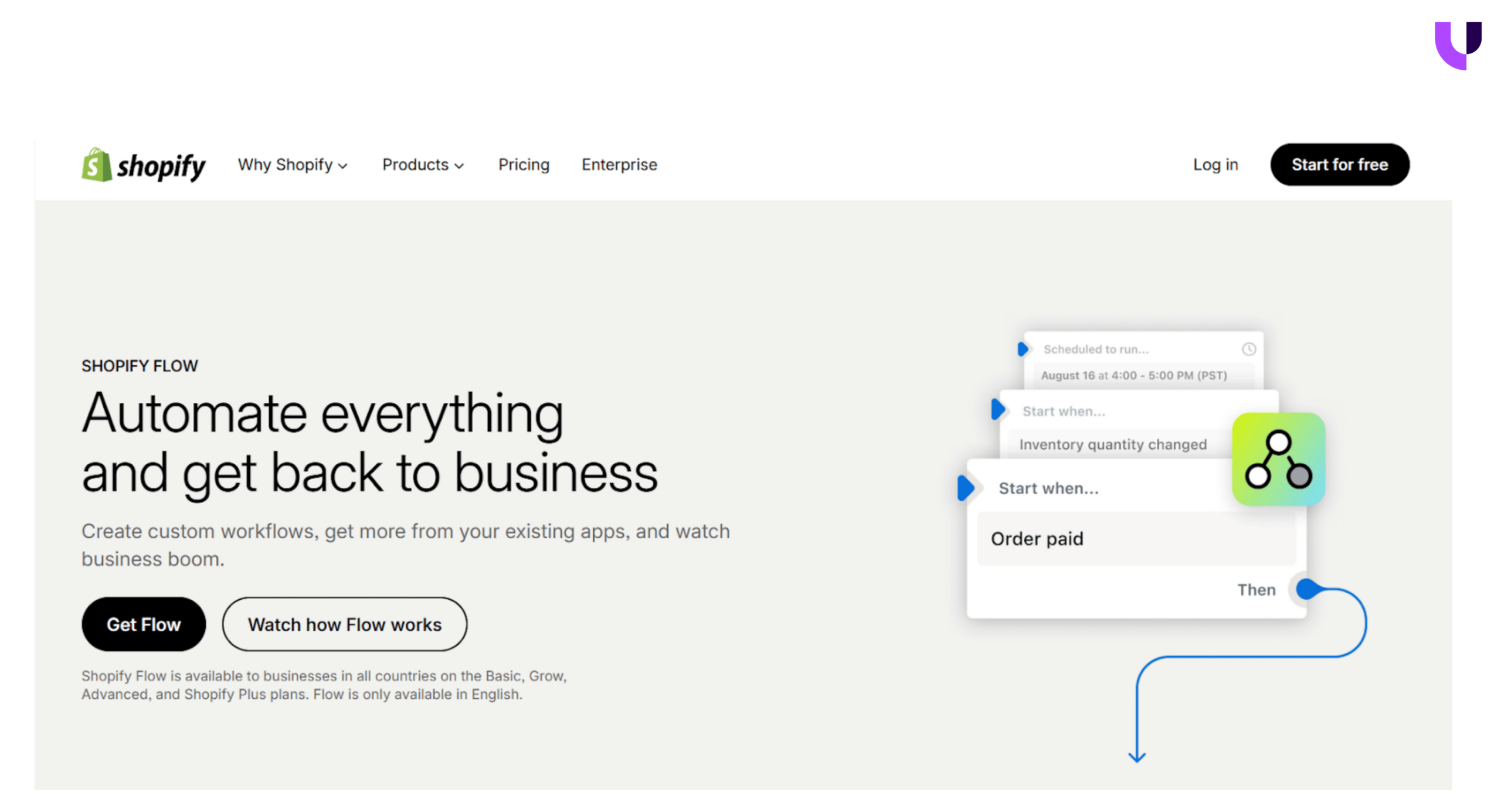
- Use Shopify Flow where possible to automate routine actions like order tagging, fraud holds, inventory alerts, and customer notifications
The goal is to remove the manual steps that most often slow down or break.
7. Expansion Starts Making the Store Harder to Change
Growth should make your store more capable, not harder to manage. But expansion also adds complexity that accumulates over time. A new channel, a wholesale tier, and an international market may each be a reasonable business decision.
However, together those changes create more rules, dependencies, and moving parts. The store may still look fine on the surface while becoming slower and harder to update underneath.
Signs that a Shopify store's architecture is falling behind growth:
- Small merchandising or pricing updates take too long to launch
- New markets or channels require repeated manual workarounds
- Search relevance gets worse as the catalog grows
- Teams hesitate to make changes because one update affects several other areas
- Product, pricing, or shipping logic becomes harder to manage across customer types
- Expansion is still happening, but the cost of change keeps rising with it
What to simplify before expanding the store further
- Check whether catalog growth is making search, filtering, or merchandising harder to manage
- Analyze the new markets, channels, or customer types that are adding too many manual rules
- Look for pricing, shipping, or fulfillment logic that now requires repeated workarounds
- Identify updates that take too long because one change affects several parts of the store
- Simplify the rules and dependencies that already exist before adding more scope
If every new initiative needs another workaround, the problem is no longer growth itself. It is the complexity building underneath it.
8. Retention and Post-Purchase Operations are Underbuilt
Acquiring a customer is the expensive part. What happens after the first order determines whether the acquisition cost was justified. Most stores invest heavily in getting buyers in, but have very little in place to bring them back.
Without a retention structure, every sale starts from zero. No follow-up sequence, no loyalty mechanism, no post-purchase experience that gives a customer a reason to return. The store keeps spending on acquisitions while leaving repeat revenue on the table.
Signs that your Shopify store is losing repeat revenue:
- No automated post-purchase email or SMS sequence is in place
- Repeat purchase rate stays flat even as new customer numbers grow
- Returns and refunds are handled reactively with no structured follow-up
- Customer lifetime value is not being tracked or acted on
- Loyalty or referral programmes are absent or inactive
What to build after the first order
- Identify what the customer currently experiences after purchase
- Check whether order updates, delivery, and return details are clear and timely
- Review whether any follow-up exists to bring customers back after the first order
- Look at whether the repeat purchase rate is improving as new customer volume grows
- Build a simple post-purchase sequence before investing further in acquisition
If every new sale starts from zero, the problem is more than just the acquisition cost. It is the lack of a stronger customer lifecycle after the initial purchase.
9. Paying for Premium Subscriptions, But Not Leveraging the Platform
Upgrading to Advanced or Plus is a significant investment. Many stores make that move because of volume, checkout needs, or team size, and then continue operating exactly as they did before.
The platform has capabilities that directly reduce manual work, improve margins, and support scale. If those are not being used, the business is paying for headroom it is not occupying.
Signs that your Shopify plan is not delivering its full value:
- Shopify Flow is available, but no automations have been built
- Custom checkout or checkout extensibility features are unused
- Reporting and analytics tools are not informing any operational decisions
- The team is handling manually what the platform can do automatically
- Scripts or functions available at the plan level have never been explored
Want to start a project with us?
Empowering businesses to achieve greatness through strategic guidance and innovative solutions.
Book A Demo
Found this post helpful? Be sure to share it with your network!


About Author
Jigar Jariwala is the Delivery Head at UNCANNY Consulting Services with expertise in Shopify, Mobile App Development, WordPress, and website design. He helps businesses build customer-centric digital experiences that drive engagement, improve online performance, and support long-term growth.


Jigar Jariwala is the Delivery Head at UNCANNY Consulting Services with expertise in Shopify, Mobile App Development, WordPress, and website design. He helps businesses build customer-centric digital experiences that drive engagement, improve online performance, and support long-term growth.